Introducing: Participation Plus+

Participation Plus+ is the latest addition to Citizen Space, an add-on package focused on inclusive design.
It's built around two new features. A new Easy Read activity type, co-designed with Easy Read specialists. And speech-to-text functionality that lets respondents speak their answers instead of typing them, processed entirely in the browser for privacy.
We could write a feature list. But the more interesting story is how it came together, what we learned along the way, and why we ended up where we did.
If you'd rather skip ahead to the details, our short overview document covers everything in the package. Otherwise, read on for the story behind it.

The problem we kept seeing
Citizen Space is already built to high accessibility standards. WCAG 2.2 AA. Screen reader compatible. Continuously tested with our accessibility consultants Tetralogical, who also advise GOV.UK. That floor is real, and we're proud of it.
But meeting accessibility standards isn't the same as being inclusive. A consultation can be technically accessible and still quietly filter out the people most affected by the decisions it informs. People with lower literacy. People with learning disabilities. People reading in a second language. People who find typing physically difficult. People who simply find it easier to talk than to write.
The most visible version of this problem is Easy Read.
Easy Read is a recognised format, originally designed for people with learning disabilities, that pairs simplified language with supporting images and a clear visual structure. The format is well established. The tools to deliver it well online, until now, have not been.
What we kept seeing in the wild was Easy Read content squeezed into formats that weren't built for it. Customers trying to manually wrangle HTML to get an image on the left and text on the right. Single radio buttons stuck together with images to make answer components. Sometimes the Easy Read version of a consultation would exist only as a downloadable PDF, buried at the bottom of an overview page, requiring a respondent to find the link, scroll past pages of dense copy, download a 27-page document, print it, fill it in, and post it back. The same respondents who already find online content overwhelming were being asked to navigate an obstacle course just to participate.
That's not inclusion. That's inclusion theatre.

Building a real Easy Read activity type
We knew we needed an Easy Read activity type built natively into Citizen Space, the kind of thing customers could select from their dashboard alongside surveys, forms, and event registrations, and publish in minutes rather than days.
The first version we built didn't work. We followed the published guidance carefully: image at 50% of the screen on the left, text at 50% to 62% on the right, larger fonts, character-per-line limits. When we put it into Citizen Space, the results were overwhelming, the images were enormous and what was happening on screen felt chaotic. In trying to build something that makes things clearer, we’d accidentally made them harder.
The published guidance, we realised, had been written for offline documents but it didn't translate neatly to the web.
So we did what we always do when building something like this; we brought in the experts.
We worked with Katie at Go Easy Read and Kate at Easy and Clear, two specialists in producing Easy Read content. They reviewed our prototypes. They challenged our assumptions and they told us, in detail, where we'd got it wrong.
That work shaped the activity type that's available today. The two-column structure, image left, text right, but properly proportioned for screens, not paper. Larger typography across the page. A single-column layout, because squeezing dates and contact details into a sidebar made the page feel cramped.
It also shaped a lot of things you might not notice unless you were looking for them.
Date phrasing rewritten as full sentences ("This activity closes on Tuesday the 5th of May") instead of abbreviated forms.
Contact details written as a complete invitation: "For help with the survey, you can contact Alyssa at..."
Buttons relabelled from "Submit response" to "Send your answers."
Error messages rewritten in softer language, because the original error copy, Katie and Kate pointed out, was unnecessarily harsh.
Some of these decisions may seem small on their own but combined together they add up to something significant: a format that genuinely meets the needs of the people it's meant for, rather than a checkbox version of inclusion.
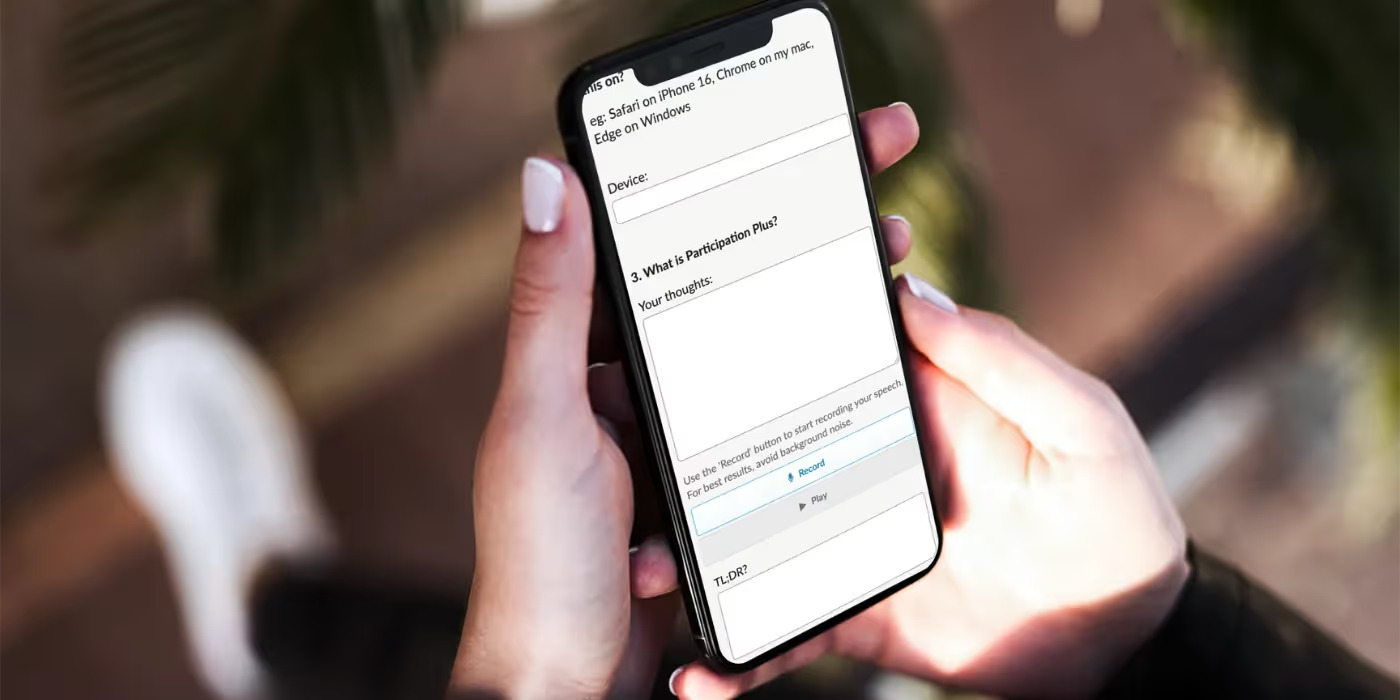
Why speech-to-text, and why it works the way it does
The second major feature in Participation Plus+ is speech-to-text. Respondents press a microphone button, speak their answer, and watch it transcribed into the response field. They can edit the text before submitting. They can play it back through a computer-generated voice if they want to check it.
This helps a variety of different audiences for a number of reasons. For example it may help people with motor impairments, dyslexia, literacy challenges, or simply those who find it easier to talk than to type.
It also helps in a less obvious context. Consultations sometimes ask people to share difficult things: experiences of healthcare, social care, discrimination, bereavement, trauma. Typing those answers in full can be hard. Speaking them is often easier, and the harder a question is to answer in writing, the more likely it is that important responses will go unsaid. Speech-to-text isn't just an accessibility feature. It's an emotional one too.
The privacy design matters. All speech processing happens in the respondent's browser. Audio never leaves their device, never reaches a server, never gets stored. For a public sector tool gathering responses on sensitive topics, that's the right default. We've already tested speech-to-text in production with a pilot customer in New Zealand, and we're now bringing it to all Citizen Space customers as part of Participation Plus+.

Inclusive design, not bolted-on accessibility
We've deliberately framed Participation Plus+ around inclusive design rather than accessibility. The distinction matters. Accessibility, in its narrow technical sense, is about making sure a product can be used. Inclusive design is about widening who gets to participate in the first place.
Citizen Space already does the first. Participation Plus+ pushes further into the second.
For organisations running statutory consultation, that distinction is increasingly more than a nice-to-have. The legitimacy of a consultation depends on who it heard from. Decisions made on the back of a self-selecting subset of confident, literate, digitally fluent respondents will reliably miss the perspectives of the people most affected by them. Closing that gap is one of the most consequential things you can do to make consultation genuinely democratic.
Pricing and next steps
Participation Plus+ is an optional add-on, available alongside your existing Citizen Space subscription rather than included in it. We've designed it that way deliberately.
Adding new capabilities to Citizen Space takes real investment, in research, design, specialist collaboration, and ongoing development. Rolling everything into the core subscription would mean raising the price for every customer, including those who don't need every new feature. We'd rather keep Citizen Space's core pricing as accessible as possible and let customers choose the add-ons that match their work.
It also means we can keep building. There are more add-ons in the pipeline, focused on different aspects of consultation and engagement work, and this approach lets us invest properly in each one without that cost falling on customers who don't need it.
If you'd like to talk through whether Participation Plus+ is right for your organisation, your Customer Success Manager is the best place to start. Or if you're not already a Citizen Space customer book a demo to get started.